Engineering software from a team that makes parts.
Turn a 3D model into a full drawing set in about a minute. Get a price estimate from a part drawing. More tools are on the way for photos, old drawings and design checks.
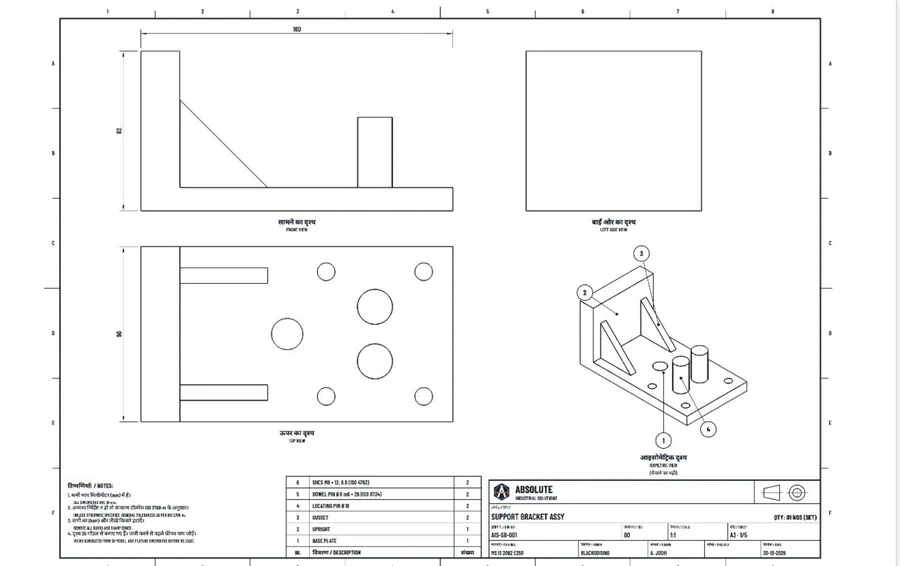 Example drawing sheetMade from the sample assembly. Open AutoDraft to make your own.
All AIS tools
What do you need to get done?
Pick the closest one. We point you to the tool, or to the team that makes it.
Made in a working factory
We build machines and parts every week. These tools started as the shortcuts our own engineers wanted.
- Your model stays with youAutoDraft reads and draws the 3D model inside your browser. Nothing is uploaded.
- Drawings the shop floor readsIsometric view on every sheet, hole callouts in plain words, Hindi and English labels.
- Pay only for what you download5 drawings free without signing in, 30 free credits when you sign up. Then packs from ₹499 (plus GST). No subscription.
- Prices from real shop ratesAI costing reads the drawing; the price comes from AIS machine and material rates, never from the AI.
Need the part, not just the drawing?
The same team makes custom parts, builds special purpose machines and fixtures, and supplies PU, plastic and rubber parts chosen for your application.
Upload & drawing
Upload a 3D model, set the front view, fill the title block, download. 5 drawings free, then 30 free credits.
Using SolidWorks or Creo? Use File › Save As › STEP, then upload the .step file.
More options
Each part gets its own sheet: overall sizes, hole callouts (tap, drill, ream, countersink, counterbore), hole and step positions from the part centre or reference faces, diameters, chamfers, fillets, tapers, drafts, a section view and the fits you choose under the 3D view. DXF gives an editable CAD file. Inspection list gives every dimension with a balloon number, limits and a gauge. Use the Advanced card below to review the sheet and add tolerances and GD&T.
Runs in your browser on this sheet. The 3D model is not sent anywhere. Each point shows the rule or standard behind it. Nothing changes on the drawing until you accept it.
Claude reads a picture of this 2D sheet together with the list of dimensions and the automatic findings, and works like a drawing checker: missing dimensions, callouts, fits, datums, what cannot be measured. The 3D model stays in your browser.
Your own drawing: the page is turned into a picture in this browser; only that picture goes to Claude. It is validated against the drafting standards checklist (title block, projection, views, dimensioning, number format, lettering, lines, holes, fits, GD&T, finish, sections).
Design check
Find what will be hard or costly to make before the part reaches the shop floor.
Problem areas turn red or orange in the 3D view. The face you set as "top" in step 1 is the direction the tool, mould or printer works from.
Process plan
Raw material, machining steps, assembly, bolts and tools for this model, ready for the shop floor.
Tap a step to see its tools and where it is on the model. Tick steps as they get done.
My account
Your sign-in, credits and the company details printed on your drawings.
Plans & pricing
Start free. Pay only when AutoDraft is saving you time.
Launch pricing. Prices are before 18% GST. GST and the payment-gateway charge are added at checkout, and you see the total before you pay. International users pay in US dollars.
- 5 simple parts, or 1 small assembly set
- All views, isometric, hole callouts
- Design check and process plan view
- Assembly and part sheets, PDF and PNG
- About ₹4.99 per credit
- Valid for 1 month
- International: US$7
- Route cards and hardware lists
- Full drawing sets in one PDF
- About ₹2.00 per credit
- Valid for 3 months
- International: US$25
- Your logo in the title block
- Priority email support
- About ₹1.67 per credit
- Valid for 4 months
- International: US$59
- Priority email support
- About ₹1.56 per credit
- Valid for 6 months
- International: US$85
- Priority email support
- About ₹1.43 per credit
- Valid for 12 months
- International: US$119
- Priority email support
Coming soon
For teams that make many drawings every month. There is no price and no payment yet. Tell us what you need and we will write to you when it opens.
Credit packs stay available. Nothing here changes what you pay today.
AI credits
AI features (AI drawing check, AI costing estimate) use AI credits. This is a separate balance from drawing credits. Every account gets 3 free AI runs. AI credits cannot be exchanged for money or for drawing credits. Prices are before 18% GST.
- About ₹29.90 per AI credit
- Valid for 3 months
- International: US$4
- About ₹25.00 per AI credit
- Valid for 6 months
- International: US$13
- About ₹23.10 per AI credit
- Valid for 12 months
- International: US$39
- About ₹22.90 per AI credit
- Valid for 12 months
- International: US$99
Questions about paying or getting money back? Read the Refund policy.
| Sheet | What makes it | Credits |
|---|---|---|
| Simple part | Up to about 40 faces and holes (plates, spacers, pins) | 1 |
| Medium part | Up to about 150 faces and holes (brackets, blocks with pockets) | 2 |
| Complex part | More features (housings, castings, dies) | 3 |
| Assembly sheet | 2 credits, plus 1 for every 5 unique parts (max 6) | 2–6 |
| AI costing estimate | One part drawing (PDF or photo): material, blank size, machines and a price range | 1 AI credit |
| Process route card | 1 credit for every 3 parts in the plan | 1+ |
Example: an assembly with 4 unique parts makes 5 sheets (1 assembly + 4 parts) and costs about 2 + 4 to 8 credits. A sheet you already downloaded downloads again free.
Prices are before 18% GST. GST and the payment-gateway charge are added at checkout. Online payments open shortly; until then, email [email protected] to buy a pack.
Help & user guide
Loading the guide. If nothing appears, email [email protected].
More
Bought-out parts
Ticked parts get no part drawing. They get a balloon on the assembly and a row on the bought-out parts list sheet. Untick a part that you make in-house.